Deposit form
The deposit form enables users to create and edit records. It’s a React-based form application that provides field validation, dynamic sections, and integration with your record model.
Key Concepts
- Wizard of sections — the form renders as a wizard with vertical tabs, built from an ordered array of section objects (one tab each). You customize the form by composing and extending this array.
- Field metadata comes from the model — labels, hints, help text, and required status are defined in your model’s YAML schema and surfaced to React via the
useFieldDatahook. You place field components; you don’t re-declare their labels in JSX. - Server renders, React mounts — the server-side view renders a page with hidden inputs (record, form config) plus an empty
<div id="deposit-form">; a small webpack entry point mounts the React app onto that div.
See How It Works Under the Hood for the full request and application-layer architecture.
Building Your Deposit Form
What the nrp-model-copier template generates depends on the base_model you chose when creating the model:
base_model | Generated forms/index.js starts from |
|---|---|
empty | A single placeholder ExampleSection — you build your own sections |
rdm_minimal | RDMMinimalSections + RDMMinimalRecordSerializer from @js/oarepo_rdm/form |
rdm_basic | RDMBasicSections from @js/oarepo_rdm/form |
rdm_complete | RDMCompleteSections from @js/oarepo_rdm/form |
ccmm | CCMMSections + CCMMDepositRecordSerializer from @js/ccmm_invenio/forms |
All variants render the form with wizard layout (useWizardForm): the form is an ordered array of section objects, one wizard tab each. Customization therefore means composing and extending this section array — for non-empty base models you mostly reconfigure (reorder/omit/override preset sections, add your own); for empty you build the sections yourself. The recommended pattern is one section file per logical group, assembled in a sections.js, mirroring how the preset sections are organized in the source packages.
Define Your Fields in the Model Schema
Add your custom fields to models/{{model_name}}/metadata.yaml. This file is for your fields only. Standard fields like title, creators, resource_type, publication_date are defined by the preset (rdm_minimal_preset, rdm_basic_preset, rdm_complete_preset, ccmm_production_preset_1_1_0) configured in models/{{model_name}}/model.py, so they are not in your YAML — and you must not repeat them here.
# Definition of metadata for {{model_name}}
# Standard RDM/CCMM fields (title, creators, resource_type, ...) are pulled in
# from the preset configured in model.py — don't redefine them here.
Metadata:
  properties:
    sample_id:
      type: keyword
      label:
        en: Sample identifier
        cs: Identifikátor vzorku
      help:
        en: Internal identifier of the chemical sample
        cs: Interní identifikátor chemického vzorku

    batch_number:
      type: keyword
      label:
        en: Batch number
        cs: Číslo šarže

    concentration:
      type: object
      properties:
        value:
          type: float
          label:
            en: Concentration
            cs: Koncentrace
        unit:
          type: keyword
          label:
            en: Unit
            cs: Jednotka
On empty models there is no preset, so every field (including title) has to be declared in this file.
See Model schema customization for details on defining field types, labels, hints, and help text.
Build Your Form from Sections
Create a section file per logical group of fields. A section is a plain object — key (used in the ?tab=key URL), label, component rendering the section (typically its fields), and includesPaths (used for error indicators and the per-tab completion bar):
import React from "react";
import { i18next } from "@translations/i18next";
import { TextField } from "@js/oarepo_ui/forms";

export const SampleInfoSection = {
  key: "sample-info",
  label: i18next.t("Sample information"),
  component: ({ record, formConfig }) => (
    <React.Fragment>
      <TextField fieldPath="metadata.sample_id" required />
      <TextField fieldPath="metadata.batch_number" />
      <TextField fieldPath="metadata.concentration.value" />
      <TextField fieldPath="metadata.concentration.unit" />
    </React.Fragment>
  ),
  includesPaths: [
    "metadata.sample_id",
    "metadata.batch_number",
    "metadata.concentration",
  ],
};
Field labels, hints and help texts come from the model schema automatically (useFieldData) — you only place the components. Collect your sections in one file, composing them with the preset sections shipped with your base model. For a non-empty base model the preset sections already cover the standard fields (metadata.title, metadata.creators, files, community, …) — your own sections carry only your custom fields:
import { RDMCommunityAndAccess, RDMFiles, RDMGeneralInformationBasic } from "@js/oarepo_rdm/form";
import { SampleInfoSection } from "./SampleInfoSection";

export const mySections = [
  RDMGeneralInformationBasic, // preset: metadata.title, creators, ...
  RDMFiles, // preset: file upload
  RDMCommunityAndAccess, // preset: community + access
  SampleInfoSection, // custom: metadata.sample_id, batch_number, concentration
];
Finally pass the array (and an optional record serializer) to the form in the generated entry point:
import { mySections } from "./sections";
import { OARepoDepositSerializer } from "@js/oarepo_ui";
ReactDOM.render(
  <DepositFormApp
    config={config}
    {...rest}
    sections={mySections}
    recordSerializer={OARepoDepositSerializer}
    useWizardForm
  />,
  rootEl,
);
See Defining Sections below for the full section-object reference (auto-save, completion indicator, locking).
Choose Field Components
Use the components documented in Deposit Form Components to add different field types:
| Component | Use for | Example |
|---|---|---|
TextField | Single-line/multi-line text input | metadata.title, metadata.name |
StringArrayField | Arrays of plain strings | metadata.keywords |
MultilingualTextInput | Localized text (array of {lang, value}) | metadata.description |
VocabularyField † | Vocabulary-selected items | metadata.resource_type |
EDTFSingleDatePicker | EDTF dates | metadata.publication_date |
EDTFDaterangePicker | EDTF date ranges | metadata.date_range |
CreatibutorsField | Persons/organizations with roles | metadata.creators |
† VocabularyField comes from @js/oarepo_vocabularies/form (package oarepo-vocabularies), not @js/oarepo_ui/forms — see VocabularyField.
Generic containers (ArrayField, GroupField, AccordionField), plain
SelectField and RichInputField are not part of @js/oarepo_ui/forms
— import them from react-invenio-forms. If no suitable field component
exists, you can create custom form
fields.
To reorder, extend, or remove parts of preset sections (CCMMSections, RDM*Sections) without rewriting them, use componentOverrides on DepositFormApp — see Using CCMM sections for worked examples, including adding content below any section and removing individual fields.
The Wizard Form
The form is rendered as a wizard with vertical tabs — the entry point passes useWizardForm together with the sections array and an optional componentOverrides map to DepositFormApp (as in Build Your Form from Sections). This section is the reference for the wizard’s behaviour and the section-object format.
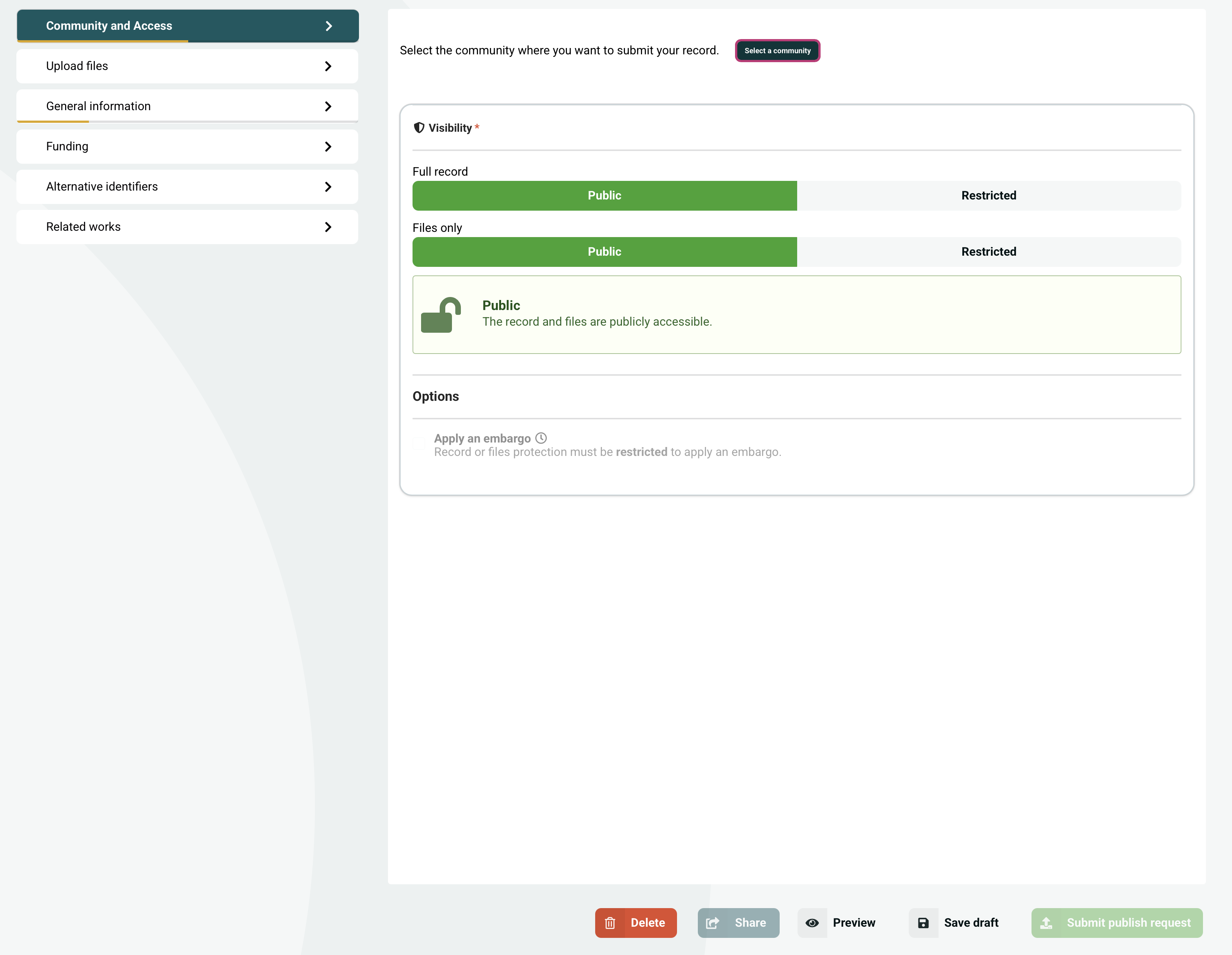
Deposit form wizard: section tabs on the left (each with a completion bar and lock/error indicators), the active section’s fields on the right.
How the Tab Form Works
- Free navigation — users can switch between tabs at any time without being required to complete or validate the current section first. A section can opt out of this and temporarily lock navigation by defining a
lockTabChangefunction (see Locking Tab Navigation). - Auto-save on tab switch — if the form has unsaved changes when switching tabs, it automatically saves the draft. This also triggers a fresh round of validation errors from the backend, so validation feedback is up to date.
- URL persistence — the active tab is reflected in the URL via the
?tab=keyquery parameter, so users can bookmark or share a link that opens directly on a specific section.
Defining Sections
A worked example is in Build Your Form from Sections above. A section does not have to render fields only — it can render any React content (e.g. the file uploader, a community picker, a custom dashboard).
Section object properties:
| Property | Type | Description |
|---|---|---|
key | string | Unique identifier for the section (used in URL as ?tab=key) |
label | string | Display label shown in the tab menu |
component | function | Called as component({ record, formConfig, activeStep, next, back, initialRecord }), returns JSX |
includesPaths | string[] | Field paths for error tracking — errors in these fields show indicators on this tab |
saveOnTabChange | bool | function | Forces a save when leaving this tab, even if the form is not dirty. Useful for sections like file upload or community selection that update Redux state rather than Formik state, so the form won’t appear dirty despite having unsaved changes. Can be a boolean, or a function ({ formikValues, reduxState, dirty, activeStep }) => boolean for conditional saving. |
sectionCompletion | function | Custom function to compute how filled the section is. Receives ({ formikValues, reduxState, includesPaths }) and must return a number between 0 (empty) and 1 (fully filled). When omitted, the built-in generic function checks each path in includesPaths via Formik values |
sectionCompletionThreshold | number | Fraction (0–1) at which the section progress bar turns from orange to green. Defaults to 0.8 |
lockTabChange | function | Optional gate that, when present on the active section, can temporarily block navigation away from that tab. Receives (formik, reduxState) and must return a boolean — return true to lock, false to allow. While locked, the other tabs render as disabled and onTabChange is a no-op. See Locking Tab Navigation |
Props available to component:
| Prop | Type | Description |
|---|---|---|
record | object | The current record/draft data. Use to read existing field values (e.g. record.ui.languages, record.is_published) |
formConfig | object | The form configuration object. Contains formConfig.config.vocabularies, formConfig.config.filesLocked, formConfig.quota, formConfig.overridableIdPrefix, etc. |
activeStep | number | Zero-based index of the currently active section tab |
next | function | Call next() to programmatically advance to the next tab |
back | function | Call back() to programmatically navigate to the previous tab |
initialRecord | object | The record data as it was when the form first loaded, before any user edits. Useful for comparing current state to the saved state |
Using CCMM sections
If during model creation you chose ccmm-invenio, your form will already be provided with prepared sections for this model.
Adding Custom Sections
import { CCMMSections } from "@js/ccmm_invenio/forms";
import { TextField } from "@js/oarepo_ui/forms";
import { i18next } from "@translations/i18next";

// Start with the shared sections and add your own at the end
export const mySections = [...CCMMSections, MyNewSection];
Adding Content to a Section via Override
Below each section’s content (and below the “unsaved changes” notice), TabContent renders an empty <Overridable> slot named ${overridableIdPrefix}.TabForm.TabContent.${section.key} — see TabContent.jsx. Registering content for this ID appends it under the section’s fields — it does not replace the section’s own fields, the error boundary, or any part of the tab. To change a field inside the section, override its per-field ID instead (next section).
import { parseFormAppConfig } from "@js/oarepo_ui/forms";

const { rootEl, config, ...rest } = parseFormAppConfig();
const overridableIdPrefix = config.overridableIdPrefix;

const BasicInfoExtra = ({ section, activeStep }) => (
  <div className="ui segment">
    <p>Additional content for {section.label}</p>
  </div>
);

const componentOverrides = {
  // Add content below the "general-information" section
  [`${overridableIdPrefix}.TabForm.TabContent.general-information`]:
    BasicInfoExtra,
};
config.overridableIdPrefix is read from the form config embedded in the page by parseFormAppConfig() — the same place the other overrides (e.g. ${prefix}.Files, ${prefix}.TabForm.FormMetadataSummary) get their prefix.
For the full component-override mechanism (overridable IDs, registration, other slots), see Component Overrides.
The override component receives these props:
section- The current section objectactiveStep- Current step indexnext- Function to navigate to next stepback- Function to navigate to previous step
Reorganizing CCMM Sections
The CCMMSections export is a fixed ordered array. If you need a different order, or want to omit some sections, you cannot simply sort or filter the imported array — you need to import the individual section objects and assemble your own array:
import {
  CCMMFiles,
  CCMMGeneralInformation,
  CCMMFunding,
  CCMMAlternativeIdentifiers,
  CCMMRelatedWorks,
  CCMMCommunityAndAccess,
} from "@js/ccmm_invenio/forms";
import { MyCustomSection } from "./MyCustomSection";

// Re-order, omit, or insert sections as needed
export const mySections = [
  CCMMGeneralInformation, // moved to first
  CCMMFiles,
  MyCustomSection, // inserted between built-in sections
  CCMMFunding,
  CCMMRelatedWorks,
  // CCMMAlternativeIdentifiers omitted entirely
  // CCMMCommunityAndAccess omitted entirely
];
Overriding Individual Fields Within a Section
Each field inside a CCMM section is wrapped in an <Overridable> component, which means you can replace or adjust it via componentOverrides in your entry point without touching the section file itself.
The overridable ID for a field follows the pattern {overridableIdPrefix}.FieldName — for example, {overridableIdPrefix}.Files for the file uploader in CCMMFiles. The prefix comes from config.overridableIdPrefix returned by parseFormAppConfig().
Hiding a field — return null from the override to remove it from the UI entirely:
const { rootEl, config, ...rest } = parseFormAppConfig();
const overridablePrefix = config.overridableIdPrefix;

const componentOverrides = {
  // Remove the file uploader section content completely
  [`${overridablePrefix}.Files`]: () => null,

  // Remove the version field from General Information
  [`${overridablePrefix}.Version`]: () => null,
};
Modifying field props — render the original component with adjusted props. The override receives the full tabConfig spread (i.e. record, formConfig, activeStep, next, back, initialRecord) as props:
import { UppyUploader } from "@js/invenio_rdm_records";

const { rootEl, config, ...rest } = parseFormAppConfig();
const overridablePrefix = config.overridableIdPrefix;

const componentOverrides = {
  // Replace the file uploader with a version that locks files
  [`${overridablePrefix}.Files`]: ({ record, formConfig }) => (
    <UppyUploader
      isDraftRecord={!record.is_published}
      config={formConfig}
      quota={formConfig.quota}
      decimalSizeDisplay={formConfig.decimal_size_display}
      allowEmptyFiles={formConfig.allow_empty_files}
      fileUploadConcurrency={formConfig.file_upload_concurrency}
      filesLocked={true} // override: always lock files
    />
  ),
};
Pass componentOverrides to DepositFormApp:
ReactDOM.render(
  <DepositFormApp
    config={config}
    {...rest}
    sections={mySections}
    recordSerializer={OARepoDepositSerializer}
    componentOverrides={componentOverrides}
    useWizardForm
  />,
  rootEl,
);
These are front-end only changes. If you are running a ccmm-invenio model, it
also has a backend part that expects certain data to be submitted from the
form. Removing a field from the UI that is required by ccmm-invenio means
there will be no way to fill in that value, and the record cannot be
published. Similarly, if you add extra sections with new fields, those fields
must also be declared in the backend model schema (e.g.
datasets/metadata.yaml).
Section Completion Indicator
Because the wizard form only validates against the server when saving (i.e. when switching tabs), validation errors are not immediately visible while the user is editing. To compensate, each tab displays a real-time progress bar that shows how much of the section has been filled in. This gives users continuous feedback on their progress without waiting for a save round-trip.
By default, the indicator uses a generic function that iterates over the section’s includesPaths and checks each path in Formik values. For each path that has a non-empty value, it counts it as filled and returns the ratio of filled paths to total paths (a number between 0 and 1).
Custom sectionCompletion functions
Some data is not stored in Formik state — for example, file uploads are managed through Redux, and community selection may live outside Formik as well. For sections containing such fields, the generic function cannot detect whether they are filled, so you need to provide a custom sectionCompletion function.
The function signature is:
sectionCompletion({ formikValues, reduxState, includesPaths }) => number // 0 to 1For file upload sections, oarepo-ui provides a ready-made function:
import { computeFilesSectionCompletion } from "@js/oarepo_ui/forms";

export const FilesSection = {
  key: "files",
  label: i18next.t("Upload files"),
  component: ({ record, formConfig }) => { /* ... */ },
  includesPaths: ["files.enabled"],
  sectionCompletion: computeFilesSectionCompletion,
};
computeFilesSectionCompletion checks the Redux state for file entries and returns 1 if at least one file has been uploaded, 0 otherwise.
Adjusting the threshold
Each section can set a custom sectionCompletionThreshold (default 0.8). The bar displays in orange below this threshold and green at or above it:
export const BasicInformationSection = {
  key: "basic-info",
  label: i18next.t("Basic information"),
  component: BasicInfoComponent,
  includesPaths: ["metadata.sample_id", "metadata.batch_number", "metadata.concentration"],
  sectionCompletionThreshold: 0.6, // turn green at 60% instead of 80%
};
Disabling the indicator
If you want to hide the section completion indicator entirely, add the following to your site overrides:
.section-completion-bar {
  display: none;
}
Locking Tab Navigation
By default, users can move between tabs freely at any point — see How the Tab Form Works. For some sections this is undesirable: a file upload may be in progress, a community selection step may need to be committed before continuing, or a particular operation must finish atomically. The lockTabChange property lets a section opt into temporarily blocking navigation while a condition holds.
The function signature is:
lockTabChange(formik, reduxState) => booleanIt is only evaluated on the currently active section. Returning true has two effects simultaneously:
- The other tabs in the menu render with
disabledso users can see they cannot be clicked. handleSetStep(the handler behindonTabChange) returns early, so programmatic navigation and keyboard navigation are blocked as well.
Returning false (the default when the prop is omitted) keeps the standard free-navigation behavior.
Because the function receives both the Formik context and the full Redux state, it can react to either form values or out-of-Formik state like in-flight file uploads:
export const FilesSection = {
  key: "files",
  label: i18next.t("Upload files"),
  component: FilesSectionComponent,
  includesPaths: ["files.enabled"],
  // Block leaving this tab while there is an upload still running.
  lockTabChange: (formik, reduxState) => {
    const files = reduxState?.deposit?.files?.entries ?? [];
    return files.some((f) => f.status === "uploading");
  },
};
lockTabChange is re-evaluated on every Redux action and on every render of
the active tab, so changes in either Formik or Redux state lock or unlock
navigation immediately — no manual refresh needed.
Because the lock is total, make sure the condition is guaranteed to clear on
its own (e.g. the upload finishes or fails). A lockTabChange that gets
stuck on true will trap users on the current tab.
Form Metadata Summary
TabForm exposes an overridable slot directly below the vertical step navigation, intended for a sidebar-style summary of the currently filled metadata. It is rendered only on large (computer) screens — on mobile and tablet the horizontal FormSteps are used instead and the slot is not displayed, so it should not be relied on as the only place to surface information.
A typical use case is keeping the most important context visible at all times while the user is filling other tabs — for example the selected community, the current access setting, the number of uploaded files, or the chosen license — so they don’t have to switch tabs to check.
Override ID: `${overridablePrefix}.TabForm.FormMetadataSummary`
The slot is rendered with the following props by default:
| Prop | Type | Description |
|---|---|---|
record | object | The current record/draft data |
activeStep | number | Zero-based index of the currently active section tab |
sections | array | The full ordered array of section objects passed to DepositFormApp |
onTabChange | function | Call onTabChange(stepIndex) to programmatically switch to a different tab |
If you need anything beyond these props (for example live form values, the persisted record from Redux, or the resolved form configuration), pull it inside the override using the standard hooks:
useFormikContext()— live form values, updated as the user typesuseSelector(state => state.deposit.record)— the persisted record from the Redux store (updates on save)useFormConfig()— the resolved form configuration (locale, vocabularies, permissions, etc.)
By default nothing is rendered in this slot; provide an override to opt in.
import React from "react";
import { useSelector } from "react-redux";
import { useFormikContext } from "formik";
import { Segment, Header, List } from "semantic-ui-react";
import { parseFormAppConfig, useFormConfig } from "@js/oarepo_ui/forms";

const { rootEl, config, ...rest } = parseFormAppConfig();
const overridablePrefix = config.overridableIdPrefix;

const FormMetadataSummary = () => {
  // Redux: persisted record (only updates on save)
  const record = useSelector((state) => state.deposit.record);
  // Formik: live form values (update as the user types)
  const { values } = useFormikContext();
  // Form config (locale, vocabularies, permissions, …)
  const formConfig = useFormConfig();

  const title = values?.metadata?.title;
  const creators = values?.metadata?.creators ?? [];
  return (
    <Segment className="mt-10">
      <Header as="h4">Metadata summary</Header>
      <List>
        <List.Item>
          <strong>Title:</strong> {title || <em>not set</em>}
        </List.Item>
        <List.Item>
          <strong>Creators:</strong> {creators.length}
        </List.Item>
        <List.Item>
          <strong>Record id:</strong> {record?.id || <em>unsaved</em>}
        </List.Item>
        <List.Item>
          <strong>Locale:</strong> {formConfig?.default_locale}
        </List.Item>
      </List>
    </Segment>
  );
};

const componentOverrides = {
  [`${overridablePrefix}.TabForm.FormMetadataSummary`]: FormMetadataSummary,
};
Prefer useFormikContext for anything you want to see change while the user is editing other tabs; fall back to the Redux record when you only care about persisted state (for example whether the record has been saved yet, or its server-assigned id).
Action Buttons
The action row at the bottom of the wizard (Save / Publish / Preview / Delete / Share Draft) is rendered as a stack of <Overridable> slots, one per button — see TabForm.jsx. Each can be hidden, replaced, or extended independently, and the whole row can be replaced via ${prefix}.TabForm.actions.
| Override ID | Default |
|---|---|
${prefix}.TabForm.DeleteButton | Invenio RDM DeleteButton (draft delete) |
${prefix}.TabForm.ShareDraftButton | Invenio RDM ShareDraftButton (grant access to the draft) |
${prefix}.TabForm.PreviewButton | Invenio RDM PreviewButton |
${prefix}.TabForm.SaveButton | Invenio RDM SaveButton |
${prefix}.TabForm.PublishButton | oarepo-ui PublishButton |
${prefix}.TabForm.actions | Wraps the whole row — replace to reorder or restyle all buttons |
The defaults come from @js/invenio_rdm_records and @js/oarepo_ui/forms.
Hide a button — return null:
const componentOverrides = {
  // Hide the Preview button entirely
  [`${overridablePrefix}.TabForm.PreviewButton`]: () => null,
  // Hide Delete for users without the delete permission
  [`${overridablePrefix}.TabForm.DeleteButton`]: () => null,
};
Replace a button — render your own component. It receives the same props the default does (record, permissions, groupsEnabled, …, depending on the slot):
const PreviewAsLink = () => {
  const record = useSelector((state) => state.deposit.record);
  return (
    <Button
      as="a"
      href={record?.links?.self_html}
      target="_blank"
      icon="eye"
      content={i18next.t("Preview")}
    />
  );
};

const componentOverrides = {
  [`${overridablePrefix}.TabForm.PreviewButton`]: PreviewAsLink,
};
Restyle the whole row — override the wrapping TabForm.actions slot. Its default is an empty fragment containing the per-button slots; replace it to add a header, change alignment, add leading content, etc.
Buttons are not “plain labels” — Save, Publish, Preview and Delete each trigger their own backend action (save draft, kick off the publish request, navigate to preview, soft-delete). Replacing one without wiring it to the corresponding Redux action will silently break that flow. Prefer hiding with () => null or wrapping the default component rather than rebuilding behaviour. The RDM reference implementation of these buttons is at invenio_rdm_records/…/deposit/controls.
useFieldData Helper
The useFieldData hook from oarepo_ui/forms provides access to field metadata (labels, help text, hints, required status, icon) defined in your model’s YAML schema. This metadata is extracted during model compilation and made available to React components.
Usage
import { useFieldData } from "@js/oarepo_ui/forms";

const MyField = ({ fieldPath }) => {
  const { getFieldData } = useFieldData();

  const { helpText, label, placeholder, required } = getFieldData({
    fieldPath: fieldPath,
    fieldRepresentation: "text", // "full", "compact", or "text"
    icon: "pencil", // optional icon
  });

  return (
    <div>
      {/* label is a React node in "full"/"compact" modes or string in "text" mode */}
      <label>{label}</label>
      <input name={fieldPath} placeholder={placeholder} />
      {helpText && <small>{helpText}</small>}
    </div>
  );
};
getFieldData Options
| Option | Type | Default | Description |
|---|---|---|---|
fieldPath | string | (required) | The path to the field in the metadata |
fieldRepresentation | string | "full" | How to render the label: "full", "compact", or "text" |
icon | string | "pencil" | Icon to display with the field |
fullLabelClassName | string | - | CSS class for full mode label |
compactLabelClassName | string | - | CSS class for compact mode label |
fieldPathPrefix | string | (auto-set) | Prefix for nested fields, configured by provider |
ignorePrefix | boolean | false | Whether to ignore the prefix |
Return Values by Representation Mode
| Mode | label | helpText | Other properties |
|---|---|---|---|
| full | React <FieldLabel> component | helpText string | placeholder, required, detail |
| compact | React <CompactFieldLabel> with popup help | (in popup) | placeholder, required, detail |
| text | Plain string | helpText string | labelIcon, placeholder, required, detail |
All modes return an object with helpText, label, placeholder, required, detail (plus labelIcon in text mode).
Create Custom Form Fields
If the available form components don’t meet your needs, you can create custom fields using these patterns:
- Wrapping
react-invenio-formscomponents - Use when extending standard form fields - Building from scratch with Formik - Use for completely custom UI not based on
react-invenio-forms
Pattern 1: Wrapping Base Components
Here’s an example of creating an UppercaseField by wrapping the standard TextField from react-invenio-forms and adding custom behavior:
import React from "react";
import { TextField as InvenioTextField } from "react-invenio-forms";
import { useFieldData } from "@js/oarepo_ui/forms";
import { getIn, useFormikContext } from "formik";

export const UppercaseField = ({
  fieldPath,
  fieldRepresentation = "full",
  icon = "arrow up",
  ...rest
}) => {
  const { setFieldTouched, setFieldValue, values } = useFormikContext();
  const { getFieldData } = useFieldData();

  return (
    <InvenioTextField
      optimized
      fieldPath={fieldPath}
      {...getFieldData({ fieldPath, fieldRepresentation, icon })}
      onBlur={() => {
        const currentValue = getIn(values, fieldPath);
        // Convert to uppercase on field blur
        if (typeof currentValue === "string") {
          setFieldValue(fieldPath, currentValue.toUpperCase());
        }
        setFieldTouched(fieldPath, true);
      }}
      {...rest}
    />
  );
};
Key elements:
| Element | Purpose |
|---|---|
InvenioTextField | Base component from react-invenio-forms with Formik integration |
optimized | Uses FastField for better performance - only re-renders when this field changes |
getFieldData() | Gets label, helpText, placeholder, required, detail from model YAML |
useFormikContext() | Access setFieldValue, setFieldTouched, and form values for custom blur behavior |
getIn() | Safely access nested field values from form state |
Pattern 2: Building from Scratch with Formik
For custom UI not based on react-invenio-forms components, use Formik directly (same pattern as react-invenio-forms TextField ):
import React from "react";
import { FastField, Field } from "formik";
import PropTypes from "prop-types";
import { Form, Popup } from "semantic-ui-react";
import { useFieldData } from "@js/oarepo_ui/forms";

const CustomField = ({
  fieldPath,
  fieldRepresentation = "text",
  icon = "pencil",
  disabled = false,
  optimized = true,
  // Props from getFieldData can be overridden here
  label,
  helpText,
  required,
  placeholder,
  ...uiProps
}) => {
  const { getFieldData } = useFieldData();

  // Get field metadata from model YAML, with props as overrides
  const fieldData = getFieldData({ fieldPath, fieldRepresentation, icon });
  const computedLabel = label ?? fieldData.label;
  const computedHelpText = helpText ?? fieldData.helpText;
  const computedRequired = required ?? fieldData.required;
  const computedPlaceholder = placeholder ?? fieldData.placeholder;

  const FormikField = optimized ? FastField : Field;

  return (
    <>
      <FormikField name={fieldPath}>
        {({ field, meta }) => {
          // Resolve error to display
          const computedError =
            meta.error || (!meta.touched && meta.initialError);

          let formInputError = null;
          if (typeof computedError === "string") {
            formInputError = computedError;
          } else if (
            typeof computedError === "object" &&
            computedError.message
          ) {
            // Error object with severity/message - show as popup
            formInputError = (
              <Popup
                trigger={<span>{computedError.message}</span>}
                content={computedError.description}
                position="top center"
              />
            );
          }

          return (
            <Form.Input
              {...field}
              error={formInputError}
              disabled={disabled}
              fluid
              label={computedLabel}
              required={computedRequired}
              placeholder={computedPlaceholder}
              icon={icon}
              id={fieldPath}
              {...uiProps}
            />
          );
        }}
      </FormikField>

      {/* Optional help text below field */}
      {computedHelpText && (
        <label className="helptext">{computedHelpText}</label>
      )}
    </>
  );
};

CustomField.propTypes = {
  fieldPath: PropTypes.string.isRequired,
  fieldRepresentation: PropTypes.string,
  icon: PropTypes.string,
  disabled: PropTypes.bool,
  optimized: PropTypes.bool,
  label: PropTypes.oneOfType([PropTypes.string, PropTypes.node]),
  helpText: PropTypes.oneOfType([PropTypes.string, PropTypes.node]),
  required: PropTypes.bool,
  placeholder: PropTypes.string,
};

export default CustomField;
Key elements explained:
| Element | Purpose |
|---|---|
FastField / Field | Formik component for form state. Use FastField (optimized mode) for better performance - only re-renders when this specific field changes |
optimized prop | When true, uses FastField. Set to false only if your field depends on other form values |
getFieldData() | Retrieves label, helpText, placeholder, required, detail from your model’s YAML schema definition |
field prop | Spread Formik’s field props (value, onChange, onBlur, name) onto input |
meta prop | Access touched, error, initialError for validation display |
computedError | Combines Formik error with optional external error prop |
| Error handling | Supports both string errors and structured objects with severity/message/description |
| Props override | label, helpText, required, placeholder props override values from getFieldData() |
Using Custom Fields
Import and use the custom field components you created above inside your section components:
import React from "react";
import { i18next } from "@translations/i18next";
import { CustomField } from "./CustomField";
import { UppercaseField } from "./UppercaseField";

export const CustomSection = {
  key: "custom",
  label: i18next.t("Custom"),
  component: ({ record }) => (
    <React.Fragment>
      <CustomField
        fieldPath="metadata.custom"
        icon="tag"
        fieldRepresentation="full"
        // Override label from schema if needed
        label="Custom Field Label"
      />
      {/* Field that automatically converts input to uppercase */}
      <UppercaseField
        fieldPath="metadata.code"
        fieldRepresentation="compact"
      />
    </React.Fragment>
  ),
  includesPaths: ["metadata.custom", "metadata.code"],
};
Optional: Custom Page Templates
Every generated model already ships ui/mymodel/templates/semantic-ui/mymodel/deposit_{create,edit}.html. These are already in the default inheritance chain — oarepo_ui.pages.Deposit{Create,Edit} (JinjaX wrapper) → mymodel/deposit_{create,edit}.html → oarepo_ui/deposit_{create,edit}.html → invenio_app_rdm/records/deposit.html — so your customizations take effect without any JinjaX component or templates registration. For the underlying templating model (Jinja vs JinjaX, template lookup, overriding by path), see Templating in NRP Repositories.
Customize via Included Partials (Recommended)
The generated deposit_create.html / deposit_edit.html comment points you at three hot-swappable partials that the parent oarepo_ui/... template auto-includes for you:
| Partial | Path (inside ui/mymodel/templates/semantic-ui/mymodel/) | Purpose |
|---|---|---|
| Form container | deposit_create/form.html | Wraps/replaces the React mount div and surrounding markup of the page body |
| JavaScript hooks | deposit_create/javascript.html | Adds model-specific <script> tags without touching the parent’s {% block javascript %} (auto-included via the ignore missing fallback) |
| CSS | deposit_create.html (Main template) | Adds model-specific stylesheets by extending the parent’s {% block css %} |
The JavaScript partial is the easiest safe override — just create the file. Content Security Policy blocks raw inline <script> tags, so the partial’s role is to pull in a webpack bundle you’ve registered for the model — not to embed code directly. Register a bundle in your model’s webpack.py (see Webpack Configuration for how registration works) and refer to it by name:
{{ webpack["mymodel_deposit_custom.js"] }}Similarly, to add custom CSS, you inject it directly into your main generated template (deposit_create.html or deposit_edit.html) rather than creating a separate partial file. Just override the CSS block, making sure to call {{ super() }} so you don’t lose the default framework styles:
{%- block css %}
  {{ super() }}
  {{ webpack['stylesheet.css'] }}
{%- endblock css %}
With the corresponding webpack entrypoint and registration, e.g.:
from invenio_assets.webpack import WebpackThemeBundle

theme = WebpackThemeBundle(
    __name__,
    "assets",
    default="semantic-ui",
    themes={
        "semantic-ui": {
            "entry": {
                # loaded via the deposit_create/javascript.html partial
                "mymodel_deposit_custom": "./js/mymodel/deposit_custom.js",
            },
            # ...
        },
    },
)
The base template’s {% block javascript %} does {% include model_name ~ "/deposit_create/javascript.html" ignore missing %}, so adding the file is enough — no other change needed. (The same applies to a deposit_edit/javascript.html for the edit page.) Scripts pulled in this way are loaded from your static bundle, so they are CSP-safe.
Do not put a bare <script>…</script> block in the partial — browsers with strict Content Security Policy (default Invenio config) will refuse to execute it. Always go through {{ webpack["…"] }} or {{ webpack_optional("…") }}, or use nonce if you must inline something.
Override a Block from the Parent Template
For larger changes (e.g. an always-visible banner next to the form rather than in the bundle JS), override a block of the parent:
{% extends "oarepo_ui/deposit_create.html" %}

{% block page_body %}
  {% if extra_context.deadline %}
  <div class="ui message warning">
    <i class="icon clock"></i>
    {{ _("Submission deadline:") }} {{ extra_context.deadline }}
  </div>
  {% endif %}
  {{ super() }}
{% endblock %}
extra_context is populated by a Resource Component — see the deadline example there.
The same pattern works in deposit_edit.html. The generated template body for an unmodified model is just {% extends "oarepo_ui/deposit_create.html" %} plus a comment block; your overrides plug in before the parent’s page_body block renders.
Optional: Resource Components
Use resource component hooks to modify form configuration or add template context. This is what supplies values like extra_context.deadline consumed by the submission deadline banner example above:
from oarepo_ui.resources.components import UIResourceComponent

class ExtraContextComponent(UIResourceComponent):
    def before_ui_create(self, *, extra_context, **kwargs):
        """Add submission deadline to the create page (used by a banner in deposit_create.html)."""
        extra_context["deadline"] = "2026-12-31T23:59:59Z"

    def before_ui_edit(self, *, record, extra_context, **kwargs):
        """Add custom context to the edit page."""
        extra_context["deadline"] = "2026-12-31T23:59:59Z"
Register in your UI resource config:
class MymodelUIResourceConfig(RecordsUIResourceConfig):
    # ...
    components = [ExtraContextComponent]
How It Works Under the Hood
Request Flow
When a user accesses the deposit form URL:
Application Layers
The deposit form application is organized into server-side and client-side layers:
Server-Side Layers
| Layer | Component | Source | Purpose |
|---|---|---|---|
| View | RecordsUIResource.deposit_create/edit() | oarepo-ui | Handles HTTP request, authenticates user, fetches record/draft data |
| Components | run_components() | oarepo-ui | Executes component hooks to modify form_config and add context variables |
| Default Component | oarepo_ui.pages.DepositCreate/Edit | oarepo-ui | Pre-defined JinjaX page component with def block |
| Model Template | model_name/deposit_edit|create.html | nrp-model-copier | Model-specific template extending oarepo_ui/deposit_edit|create.html |
| Base Template | invenio_app_rdm/records/deposit.html | invenio-app-rdm | Provides page skeleton (CSS, JS, header, footer blocks) |
| Form Content | deposit/form.html | oarepo-ui | Renders hidden inputs with config and placeholder div for React app |
Client-Side Layers
| Layer | Component | Source | Purpose |
|---|---|---|---|
| Entry Point | {{model_name}}/semantic-ui/js/{{model_name}}/forms/index.js | Model-specific (nrp-model-copier ) | Webpack entry that mounts React app to #deposit-form div |
| Form App | DepositFormApp | oarepo-ui | Main React form component with providers, router, and context |
| Bootstrap | DepositBootstrap | invenio-rdm-records | Wires the form into redux via DepositFormSubmitContext and BaseForm (save/publish/preview/delete actions) |
| Form Layout | BaseFormLayout | oarepo-ui | Generic form layout component with overridable fields container |
| Sections | {{model_name}}/semantic-ui/js/{{model_name}}/forms/index.js (+ section files you add) | Model-specific (nrp-model-copier ) | Your custom sections composing the wizard form |
UI Resource Routes
The deposit routes that trigger this flow are defined in your model’s UI resource config:
from oarepo_ui.resources.records.config import RecordsUIResourceConfig

class MymodelUIResourceConfig(RecordsUIResourceConfig):
    blueprint_name = "mymodel"
    url_prefix = "/mymodel"

    routes = {
        "deposit_create": "/uploads/new",
        "deposit_edit": "/uploads/<pid_value>",
        # ... other routes
    }
Template Context
When no custom page template is configured, oarepo-ui uses the default page component (oarepo_ui.pages.DepositCreate or oarepo_ui.pages.DepositEdit). This component declares all context variables in a {# def #} block and extends your model’s base template.
The {# def #} block below is from the deposit_create page component (the deposit_edit block is identical except it omits preselectedCommunity and adds file_modification = {}):
{# def
  theme,
  forms_config,
  searchbar_config,
  record,
  community,
  community_ui,
  community_use_jinja_header,
  files,
  preselectedCommunity=None,  # create only
  files_locked,
  extra_context,
  ui_links,
  permissions,
  webpack_entry,
#}
{% extends model_name ~ "/deposit_create.html" %}
The default component extends your model’s base template (mymodel/deposit_create.html or mymodel/deposit_edit.html), which is provided by nrp-model-copier and extends oarepo_ui/deposit_create.html / oarepo_ui/deposit_edit.html.
These context variables are available in your templates:
| Variable | Description |
|---|---|
theme | Theme configuration |
forms_config | Form configuration |
searchbar_config | Search bar configuration |
record | Current record data (for edit mode) |
community | Community data if applicable |
community_ui | Community UI data |
files | Record files entries |
extra_context | Additional context from resource components |
ui_links | UI links |
permissions | User permissions |
webpack_entry | Webpack entry point for the deposit form JavaScript |